Considering robotic process automation (RPA) for your business? UiPath and Power Automate dominate the market, together holding around 70% of the global market share. Both platforms aim to boost productivity, reduce manual labor, and streamline workflows by automating monotonous tasks. While they share similar goals, each has unique features and strengths that cater to different industries.
Overview of UiPath and Power Automate
1. UiPath
UiPath is a comprehensive RPA platform that combines traditional robotic process automation (RPA) with AI capabilities for more complex tasks like document interpretation. It offers an end-to-end solution, covering process discovery, automation design, deployment, and continuous monitoring, and analytics through tools like Process Mining, Task Mining, and Insights.
UiPath’s core capabilities include:
- Drag-and-drop workflow: UiPath’s Studio allows users to build automation workflows easily through a visual drag-and-drop interface. This reduces complexity and is accessible for users at various technical skill levels, including developers and non-developers. For business users, StudioX offers even more simplicity, enabling automation without needing code.
- Advanced integration: UiPath integrates seamlessly with several third-party platforms and technologies, including enterprise applications, cloud services, and analytics tools. This compatibility with platforms like Salesforce, SAP, and Google Cloud enhances its usability across various enterprise environments.
- User-friendly Interface: UiPath’s intuitive design and easy-to-use layout lower the learning curve, making it easier to adopt RPA for multiple business processes.
- Advanced Data Scraping and OCR: UiPath offers sophisticated data extraction through its screen scraping and optical character recognition (OCR) capabilities. These tools allow users to extract information from documents, websites, images, and PDFs.
- UiPath Orchestrator: Orchestrator is a powerful web-based tool that helps manage, deploy, schedule, and administer automated procedures and RPA bots. It provides real-time analytics and dashboards for performance tracking, as well as robust governance, compliance, and security features.
- Automation Hub: Automation Hub offers an interactive space to identify, manage, and prioritize automation opportunities. It allows teams to submit automation ideas, track their progress, and measure their impact on the organization. It also includes tools for estimating the potential ROI of each automation and tracking implementation costs. By centralizing automation efforts, it enables better decision-making and alignment with business goals.
- AI Center: UiPath AI Center integrates machine learning (ML) models into automation workflows, streamlining tasks that involve decision-making, text interpretation, and prediction.
Power Automate
Microsoft Power Automate is a cloud-based SaaS platform that allows users to automate workflows across applications and systems. It is the application of choice for organizations using the Microsoft ecosystem due to its seamless integration with products like Office 365, SharePoint, and Teams. Power Automate enables users to automate tasks, improve productivity, and streamline processes through an intuitive drag-and-drop interface.
Power Automate’s core capabilities are:
- Unattended and attended automation: Power Automate supports both unattended and attended automation. Unattended bots run independently to handle repetitive tasks without user involvement, while attended bots assist users in real-time, responding to user actions.
- Power Virtual Agents: Although distinct from workflow automation, Power Virtual Agents (PVA) can be integrated with Power Automate to create intelligent chatbots that interact with users, answering queries, resolving common issues, or automating repetitive tasks.
- Alerts and Data Syncing: Users can synchronize data between multiple applications or trigger alerts based on specific workflow events, ensuring better collaboration and coordination.
- Workflow Automation: With Power Automate, users can design workflows to automate repetitive processes by integrating various applications. These workflows can range from simple tasks like sending emails to more complex processes like project management.
- Data manipulation: Power Automate can manipulate data across different formats, allowing users to perform tasks like creating records, updating fields, or aggregating data from multiple sources to generate consolidated reports.
- Integration with multiple platforms: It offers pre-built connectors for numerous platforms, including Microsoft services (e.g., SharePoint, Outlook, and Teams) and third-party applications (e.g., Salesforce, Dropbox, and Twitter). This allows users to create workflows that span across multiple platforms.
- Custom connectors: Power Automate allows users to create custom connectors for internal applications. This feature enables integration with systems that do not have ready-made connectors, improving workflow automation.
UiPath vs Power Automate: Gartner’s take
Gartner’s Critical Capabilities report provides valuable insights into UiPath and Power Automate performance across various industries.
Gartner recognizes UiPath as a leader in the RPA market. The UiPath Business Automation Platform provides hyperautomation capabilities, including RPA, AI, and process orchestration. The platform supports both professional and citizen developers through secure and collaborative design studios. Recent AI updates, such as communication mining and point-and-click model training, enhance its usability in diverse industries. However, Gartner points out some challenges. These include concerns about pricing models and the quality of partner services, suggesting UiPath improve its complementary technologies and ensure high standards within its partner ecosystem.
Microsoft is also a leader in the Magic Quadrant with Power Automate. This platform is built for cloud-first automation and integrates seamlessly with the Azure ecosystem. Power Automate offers RPA, IDP, and task mining, making it easy for existing Microsoft users to adopt. Gartner notes that the platform’s increased availability contributed to a 125% rise in Microsoft’s RPA operations between 2021 and 2022. Gartner also praises its user-friendly design and competitive pricing strategy. However, many users find it confusing to differentiate between Power Automate and its desktop counterpart, Power Automate for Desktop (PAD). Moreover, some customers struggle with integrating legacy systems, so a cloud-first approach is recommended for the best results.
Microsoft Power Automate vs UiPath: How customers feel
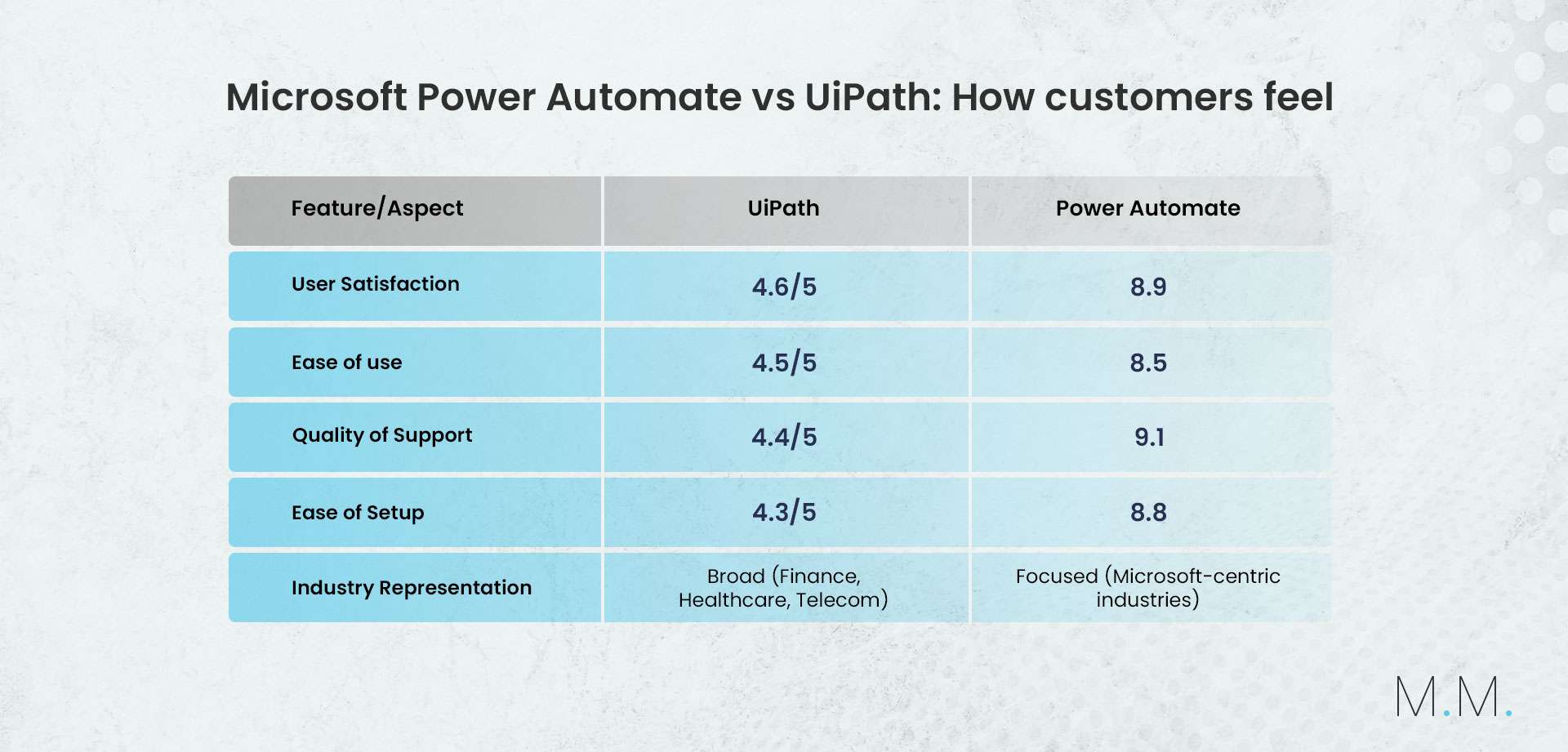
Overall, UiPath achieved a strong rating of 4.6 from 5,111 reviews, slightly ahead of Power Automate’s 4.5 based on 421 reviews. While UiPath excelled in user satisfaction and support quality, Power Automate stood out for its ease of setup and user-friendliness.
UiPath has received positive feedback across industries for being user-friendly, reliable, and offering strong integration capabilities. One telecom customer highlighted its effectiveness in integrating routine tasks, enhancing operational efficiency, and even called it the “best way to automate processes.” However, pricing remains a major issue, especially for enterprises. Some users have also experienced issues with OCR capabilities and execution speed, describing them as, “a little buggy.”
Power Automate is praised for its no-code platform, making workflow creation accessible for beginners. Users appreciate its versatility and integration with external apps, with many finding the interface “intuitive and easy to learn.” Many also appreciated the templates, tutorials, and other resources available. On the downside, some reviewers mentioned that it struggles with more advanced automation needs. Some also find it “overwhelming and intimidating” due to limited documentation. A telecom customer notes that “most of the integration is premium,” hinting at potential additional costs for full functionality.
Comparing pros and cons: Power Automate vs. UiPath
UiPath Pros
- Advanced automation capabilities: UiPath offers sophisticated automation features, such as process mining, AI integration, and complex data extraction. It supports both attended and unattended automation, making it versatile for various use cases in industries like telecom. Its Document Understanding tool efficiently processes structured and unstructured data, reducing manual effort and improving productivity.
- Data analysis: UiPath Insights delivers detailed RPA analytics, enabling users to track performance metrics and optimize workflows. This tool helps businesses make data-driven decisions, ensuring continuous process improvement.
- Scalable RPA deployment: UiPath is highly scalable and integrates seamlessly with multiple applications, thanks to its API support and built-in connectors.
- UiPath Community: UiPath has a large, active community of professionals and developers who share advice, templates and tutorials. This makes troubleshooting easier and provides strong support through forums and events.
- Extensive third-party integrators: UiPath has a vast library of pre-built connectors for popular business systems, including CRM and ERP platforms. For more niche systems, custom connectors can be created, ensuring that even proprietary or less common applications can be integrated smoothly.
UiPath Cons
- Costly for smaller enterprises: UiPath can be expensive, particularly for smaller businesses operating on tight budgets. Up-front licensing fees, bot licenses, and recurring costs for features like cloud or enterprise support can all rack up costs significantly.
- Challenges with larger implementations: While UiPath is user-friendly for smaller projects, scaling up may require specialized skills and careful project management. Users have reported performance lags during complex deployments, especially when handling large-scale processes or integrating legacy systems.
- Learning curve for the Interface: UiPath’s user interface can be clunky and overwhelming for new users. Although it’s designed to be user-friendly, beginners may struggle with navigation and layout, which can slow their learning process.
Power Automate Pros
- Seamless connectivity across platforms: Power Automate’s standout feature is its seamless integration with Microsoft’s software suite, allowing it to automate business processes quickly and efficiently. It also supports numerous connectors for popular industry applications like Adobe, Google Suite, Salesforce, and more. This interoperability makes it a versatile tool for streamlining workflows across various platforms.
- Flexible pricing plans: Power Automate provides a 30-day free trial, letting users test the platform before purchasing. It offers three pricing tiers to meet varying business needs, allowing access to premium capabilities like AI Builder and cloud workflows.
- Ease of use: Power Automate features a user-friendly coding environment, making it accessible for staff with limited technical skills. The deployment process is quick and straightforward, thanks to helpful resources like tutorials, step-by-step guides, and a supportive community.
- Ready-made workflows and layouts: With various pre-built automation templates, Power Automate enables users to start executing routine business tasks right away.
Power Automate Cons
- Difficulty adapting to complex automation: While Power Automate is user-friendly for those with minimal coding skills, advanced projects may require extra configuration or programming knowledge. Organizations with complex processes might need to invest in technical resources and training.
- Limited workflow capacity: Power Automate can handle many workflows effectively, but it may struggle with large-scale or highly complex processes. Users have noted limitations on the number of runs and the size of data that can be processed.
- Performance challenges: Although generally reliable, some users have faced performance issues. Reported issues include activation failures, interruptions, and connectivity problems, which can impact the effectiveness of automation.
Conclusion
Both UiPath and Power Automate offer strong RPA capabilities but serve different needs. UiPath excels in managing complex workflows, making it ideal for enterprises that require advanced features, AI-driven processes, and extensive customization. With its ability to scale, UiPath suits larger organizations seeking deep automation across various functions.
In contrast, Microsoft Power Automate appeals to users seeking a more intuitive, low-code/no-code solution, especially those already embedded in the Microsoft ecosystem. Its ease of integration with Microsoft’s tools makes it a practical choice for companies that prioritize user-friendliness and quicker deployment.
Ultimately, the choice between UiPath and Power Automate depends on an organization’s specific needs, technical expertise, and automation goals. For businesses looking for advanced capabilities, UiPath may be the best fit, while Power Automate is better suited for teams seeking simpler automation solutions.