Humans experience a range of emotions—energy, fatigue, motivation, boredom—that naturally affect their work. While people excel at problem-solving and critical thinking, they can’t work non-stop or completely avoid mistakes.
This is where intelligent automation comes in. Like a tireless assistant, it doesn’t get exhausted, bored, or make errors, and it continuously improves. From processing invoices and handling customer inquiries to analyzing large datasets and making decisions, intelligent automation takes over repetitive tasks, freeing people to focus on higher-level, creative, and innovative work.
By combining artificial intelligence (AI) and machine learning (ML) with robotic process automation (RPA), intelligent automation streamlines and optimizes entire business workflows.
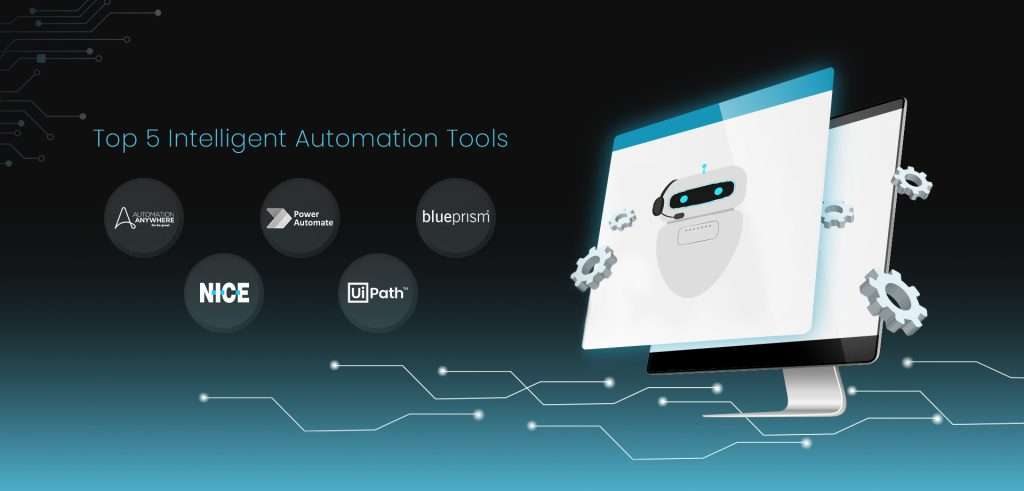
This article explores the top five automation tools recognized as “Leaders” by Gartner in its Magic Quadrant, setting new standards for automation: UiPath, Automation Anywhere (AA), Blue Prism, Power Automate, and NICE.
A quick overview: The top 5 intelligent automation tools
Gartner recognizes the following intelligent automation tools as “Leaders” in its Magical Quadrant:
1. UiPath
UiPath’s Business Automation Platform offers comprehensive integration of RPA with AI capabilities like computer vision and natural language processing (NLP), making it suitable for various industries and processes.
2. Automation Anywhere
The Automation Success Platform addresses diverse enterprise needs with its AI-driven process discovery, extensive bot library, robust security features, and scalable automation solutions.
3. Blue Prism
SS&C’s Blue Prism features a user-friendly interface for easy automation deployment and management, along with strong compliance mechanisms, making it ideal for highly regulated environments.
4. Power Automate
Microsoft’s automation platform offers a low-code interface, an extensive library of pre-built templates, and integration with over 400 connectors. Its advanced AI features allow accessibility for users at various programming skill levels.
5. NICE
NICE RPA provides both attended and unattended automation, along with desktop analytics. Its user-friendly interface, real-time monitoring, AI-integration, error handling, and multi-platform support, make it a versatile choice for optimizing front- and back-office functions.
Essential capabilities of intelligent automation tools
What makes intelligent automation “intelligent”? Its core capabilities do. Here’s a breakdown of these capabilities.
• Data scraping
Intelligent automation solutions can automatically extract data from digital sources like websites and databases. This automates data entry, populates databases, and gathers information efficiently.
• Task recording
IA software can record keystrokes and capture user interactions with applications. This allows users to automate workflows by simply performing the task once, even without programming knowledge.
• Attended & unattended automation
Intelligent automation supports both attended and unattended automation. Attended automation assists human employees in tasks that involve client interaction, enhancing customer experience. Unattended automation operates independently, handling back-office processes without human intervention.
• Orchestration
IA tools manage and coordinate multiple automated processes seamlessly, ensuring smooth workflow execution. Orchestration manages task dependencies, ensures proper resource allocation, and creates end-to-end automation workflows.
• Multi-bot support
IA can deploy and manage multiple bots simultaneously, allowing tasks to run concurrently for faster results. This boosts efficiency and scalability by distributing workloads among specific bots.
• AI technology
The describing word in the phrase ‘intelligent automation’ is ‘intelligent,’ meaning thereby, that IA automation platforms possess capabilities that make them intelligent, which in software terms, can be interpreted as being equipped with artificial intelligent technology. Examples of artificial intelligence technology that intelligent automation tools may be equipped with include:
1. Optical Character Recognition (OCR) and Intelligent Document Processing (IDP)
IA solutions use OCR to extract data from physical documents, scanned papers, and images, converting them into editable or searchable formats. IDP processes unstructured and semi-structured documents, extracting complex data for automation.
2. Computer Vision
Computer vision enables IA tools to interpret visual information, allowing them to recognize images, detect objects, and even identify faces.
3. Natural Language Processing (NLP)
NLP equips automation tools to understand, generate, and respond to human language. Applications include language translation, voice recognition, sentiment analysis, and customer service chatbots.
4. Machine Learning (ML)
ML allows bots to learn from data and improve performance without explicit programming. In intelligent automation, ML helps bots make predictions and solve complex problems based on prior experience.
5. Generative AI (GenAI)
From text to images, music, and graphics, GenAI can create new content based on input data.
This adds a creative dimension to automation, previously reserved for humans.
In addition to their core capabilities, IA solutions may also include some optional capabilities.
Additional capabilities of intelligent automation
• Smart workflows
Some IA tools include smart workflows with decision-making capabilities, allowing them to adapt to changing conditions and requirements. This enables efficient handling of complex tasks.
• Process mining
Process mining enhances business processes through consistent monitoring and analysis. IA tools with this capability examine event logs to identify loopholes, bottlenecks, inefficiencies, and opportunities for improvement, helping organizations optimize their operations.
• Task mining
IA tools with task mining capabilities can review employee actions and interactions with various applications to pinpoint repetitive tasks suitable for automation, thereby increasing productivity.
• Low-code/no-code experiences
Low-code and no-code platforms allow employees with little to no coding skills to participate in the automation process. By providing visual interfaces and drag-and-drop tools, these platforms make it easy to create workflows, enabling wider deployment across the organization.
• CoE development support
Some IA solutions go beyond automation by providing tools to create and manage a Center of Excellence (CoE). A CoE provides expertise and governance frameworks to oversee automation initiatives. By guiding organizations and establishing best practices, it supports broader IA adoption and delivers comprehensive automation solutions.
Key IA software metrics to measure
Tracking key IA software metrics allows companies to measure the impact of intelligent automation and optimize its effectiveness, efficiency, and financial return. These metrics provide data for making informed decisions about scaling automation and increasing business value:
• Bot utilization
Bot utilization measures the percentage of time bots are actively working versus idle. High utilization indicates efficient deployment and automation.
• Success rate
This metric tracks the percentage of tasks completed without errors or omissions, indicating the reliability of automation.
• Return on investment (ROI)
ROI evaluates the financial value of automation by comparing cost savings and benefits against the total cost of implementation, including labor, infrastructure, and productivity improvements.
• Accuracy and cost per error
Accuracy measures the percentage of tasks completed correctly, while cost per error calculates the average financial impact of each mistake. Together, they assess the quality of automation and highlight areas for improvement.
• Product velocity
Product velocity measures how quickly new bots or workflows can be developed and deployed. It reflects the agility and scalability of the platform, with factors like integration ease and low-code/no-code interfaces playing a significant role.
• Downtime and productivity losses
Downtime tracks periods when automation systems are non-operational due to maintenance or outages. This metric, along with productivity losses, quantifies the financial impact of system downtime and highlights the need for reliable, fast-recovery systems.
Top 5 intelligent automation tools
1. UiPath
UiPath is an end-to-end RPA platform designed to empower organizations to “see new possibilities, think bigger, and achieve more.” Leading firms like Gartner, Forrester, and Everest Group consistently recognize UiPath as an industry leader.
UiPath’s Business Automation Platform integrates RPA with AI capabilities, enabling both attended and unattended automation. It automates simple tasks and complex workflows, making it versatile for organizations of all sizes. The platform’s low-code interface makes it accessible to technical and non-technical users alike.
Key capabilities include:
- Task mining
- Task capture
- Communications mining
- GenAI
- IDP
UiPath streamlines different work processes, including UI and API automation, low-code development, and process orchestration for managing multiple automated tasks efficiently. It supports organizations with real-time analytics, automated testing, centralized process management, and cloud-native solutions.
Insights from Gartner’s Critical Capabilities report
Gartner recognizes UiPath as a leader in its Magic Quadrant, which ranks organizations based on their vision and execution abilities. UiPath effectively serves all customer segments, boasting a global presence in diverse markets. Its cloud-native platform includes tailored design studios for both professional and citizen developers.
Gartner highlights UiPath’s recent advancements, such as simplified ML training for non-experts, enhanced AI computer vision, and Communications Mining for processing unstructured data. UiPath also plans to introduce a GenAI co-pilot for creating apps and automations using natural language interactions.
Pros & Cons
Pros
- Significant market influence due to its strong brand and AI-driven automation
- Able to fulfill its automation promises, supported by substantial revenue and a robust partner network
- Serves more than 10,000 enterprises worldwide
- Integrates well with major enterprise software suites
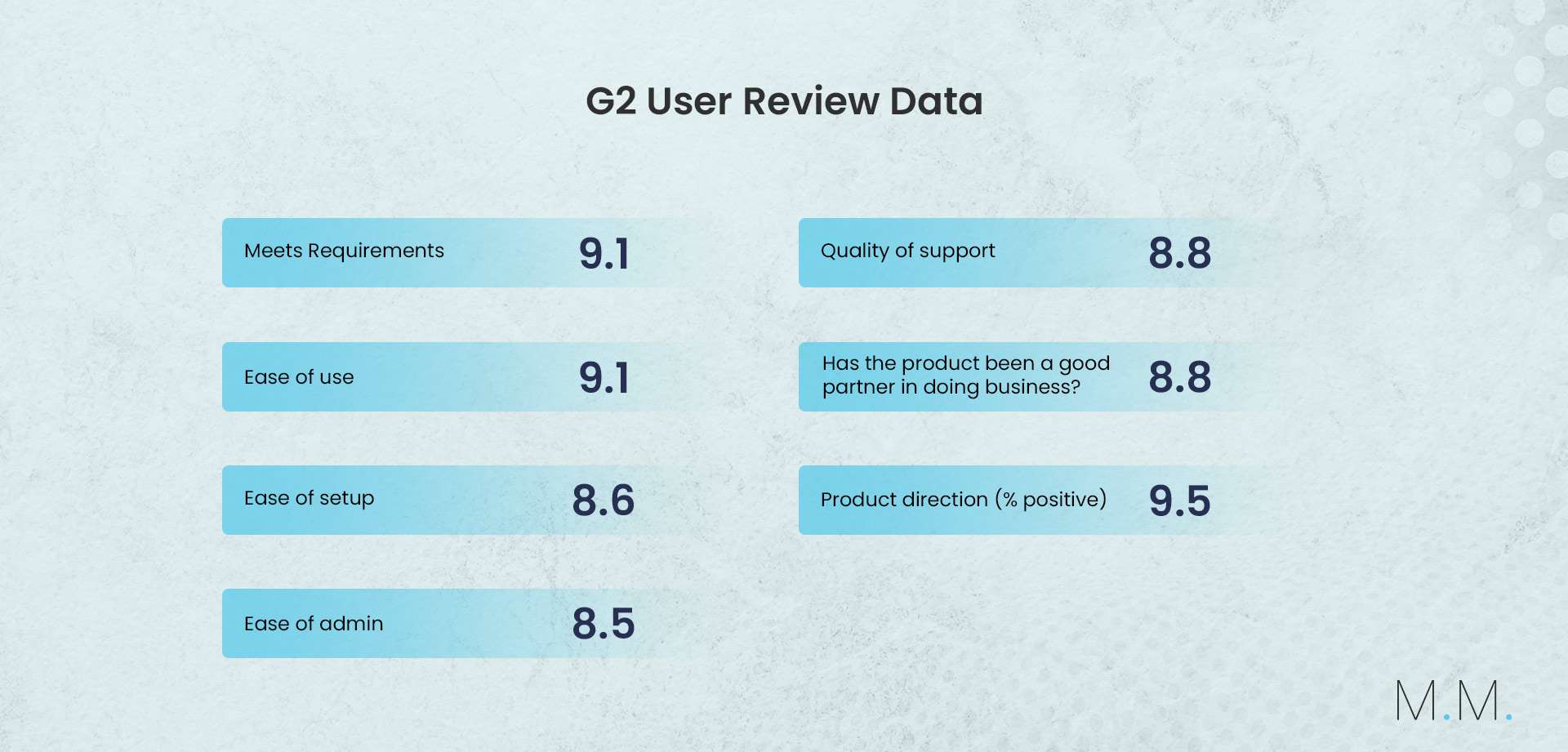
- Received favorable reviews on platforms like G2
Cons
- UiPath’s features may fall short for organizations with advanced hyperautomation needs and complex workflows
- Some recommended partners may not deliver consistent quality
- May be more expensive compared to other automation options
- Deploying and managing on-premise installations may require advanced IT skills
2. Automation Anywhere
A leading IA platform, Automation Anywhere (AA) claims to “define the future of work.” By incorporating artificial intelligence into everyday tasks, the platform allows human employees to focus on creativity and innovation.
Key features of AA’s Automation Success Platform:
• Discover
The process discovery feature analyzes business processes to identify high-ROI automation opportunities.
• Automate
Users can leverage AI, RPA, APIs, and process orchestration to create, deploy, and manage automations across the enterprise.
• Scale
The platform provides tools and support to help organizations scale their automation programs, including training, documentation, monitoring, and metrics. Features like CoE Manager and citizen development promote smooth automation adoption and governance.
• Connect
AA integrates with numerous applications, such as ChatGPT, Salesforce, and Google Cloud, enabling automation across an organization’s digital landscape.
• Transform
AA transforms business process management by automating repetitive and complex tasks, improving efficiency, reducing errors, and boosting productivity and cost savings.
Insights from Gartner’s Critical Capabilities report
A Leader in Gartner’s Magic Quadrant, AA offers both cloud-based and on-premise RPA services. Its cloud-native solutions include API capabilities, process orchestration, and AI/ML tools. Serving businesses of all sizes, AA offers features like process discovery and CoE management to meet diverse needs. Looking ahead, AA plans to enhance its orchestration, API, and generative AI capabilities, while transitioning to use-case-based pricing.
Pros & Cons
Pros
- Innovates with advanced features like AISense (for computer vision), IQ Bot (for AI/ML), and the cloud-based Automation Success Platform
- Embeds automation within business applications, allowing users to automate tasks directly in their preferred tools
- Helps customers build and scale automation through the Pathfinder Program
- Offers an extensive marketplace (“Bot Store”) with many ready-made solutions
Cons
- Faces challenges when migrating from legacy platforms
- Discontinued its Partner Pack, which may raise costs for new customers
- Some reports of subpar implementation experiences on certain projects
- Analytics capabilities may be less comprehensive than those offered by other platforms
- Manual intervention required for changes, incurring time and costs
3. Blue Prism
A leader in the RPA market, Blue Prism’s vision is to “master the unknown with intelligent automation.” It is known for its robust, scalable, and accurate RPA solutions that easily integrate into existing systems. A standout feature is its visual process designer, which uses a low-code/no-code interface. This allows both technical and non-technical users to easily create, test, and modify automated workflows with a drag-and-drop option. Another unique feature is the Robotic Operating Model (ROM), which offers a structured framework to help organizations scale their automation efforts effectively.
The platform is tailored primarily for large enterprises, handling critical, high-volume processes while ensuring compliance and security.
Insights from Gartner’s Critical Capabilities report
SS&C’s Blue Prism serves 50,000 customers across 5,000 enterprises. Its IA platform includes capabilities like IDP, process intelligence, and integration with multiple clouds.
Looking ahead, Blue Prism plans to develop a cloud-native SaaS platform with flexible pricing, integrate with the SS&C Everywhere data fabric to unify data across its extensive product portfolio, and enhance application capabilities, including advanced computer vision.
Pros & Cons
Pros
- Boasts a diverse product portfolio, offering extensive RPA capabilities and seamless integration with other products in its IA portfolio
- Designed for enterprises, making it accessible to users with varying technical skills
- Supports integration with Firefox, Edge, and Chrome browsers
- Robust business model featuring its core RPA product and multiple cloud alliances
- Offers a single price bundle that includes all key solutions, such as the orchestrator, development studio, and product support
Cons
- Prices have increased due to the inclusion of previously optional costs
- Offers fewer regulatory compliance standards than many competitors
- Offers few embedded automation features, and lacks pre-built automation for common enterprise applications
4. Power Automate
Microsoft’s Power Automate is a low-code development platform that lets both technical and non-technical users engage in automation using a simple drag-and-drop interface.
A standout feature of Power Automate is its extensive library of pre-built connectors. Users can integrate multiple applications, including Microsoft products and third-party tools like Dropbox and WordPress. This capability simplifies the creation of complex workflows spanning multiple systems, automating tasks such as data collection and file synchronization.
Power Automate also integrates AI-powered features, such as the Copilot, which assists users in building workflows. This enhances the automation of more complex and intelligent tasks.
Insights from Gartner’s Critical Capabilities report
Microsoft’s RPA product, Power Automate, caters to large enterprises and SMBs globally, offering cloud-first and API-first automation, along with desktop-based automation. Its intelligent automation package integrates RPA with API orchestration, AI, IDP, task and process mining, and OCR.
In the near future, customers can anticipate features like reusable UI element collectors in the designer studio, additional cloud connectors in the desktop flow designer, and picture-in-picture execution for attended automation.
Pros & Cons
Pros
- Offers numerous features, including automation, integration, analytics, and easy app development, all within one platform
- Enhances workflow automation capabilities through GenAI integration and investment in Large Language Models (LLMs)
- Easily integrates with popular Azure applications
- Widely accessible to Microsoft’s global user base
- Offers a user-friendly pricing structure, including a free version and discounts for Microsoft customers
Cons
- May struggle to integrate with legacy back-office systems
- RPA orchestration is limited to the cloud
- Power Automate Desktop (PAD) is unavailable for macOS or Linux, preventing users on these platforms from running RPA bots. This limits their ability to use Microsoft’s RPA and may hinder adoption in those environments.
- Difficult to navigate between Microsoft’s cloud and desktop flows
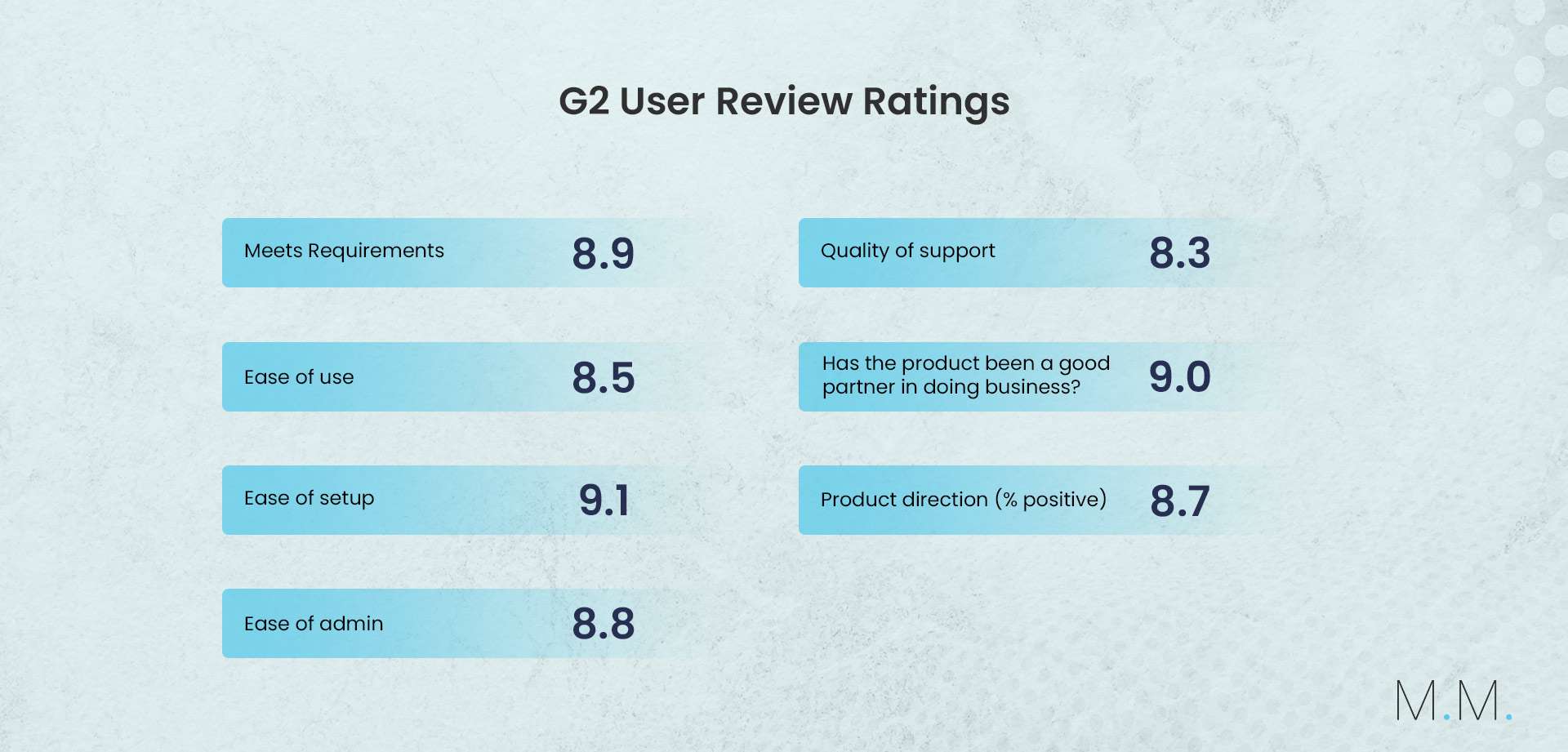
5. NICE
NICE is a leader in attended automation, with over 30 years of experience managing large automation projects. Its user-friendly interface enables seamless and simplified deployments. NICE optimizes both front- and back-office functions, making it a versatile choice for streamlining operations and boosting productivity.
NICE Employee Virtual Assistant (NEVA) is a leading attended automation solution that transforms customer experience by providing real-time automation and guidance for employees. Integrating NEVA enhances staff performance, optimizes workflows, and elevates customer service.
Insights from Gartner’s Critical Capabilities report
Gartner recognizes NICE as a Leader in its Magic Quadrant for its RPA product, NICE RPA. This platform caters to large enterprises and SMBs globally and includes three components: NEVA Discover for task mining, NEVA Unattended, and NEVA Assist for attended automation.
NICE is currently developing an RPA migration tool and enhancing NEVA with self-service capabilities. It also plans to introduce “click-to-guide” features in NEVA Discover to help organizations ensure process compliance.
Pros & Cons
Pros
- Adapting to changing consumer demands by shifting focus from back-office functions to customer-facing areas that enhance engagement and service delivery
- Offers targeted solutions for scalability via personalized attended bots
- Facilitates developer collaboration through an interactive community offering resources like forums, FAQs, and documentation
- Integrates AI features like NEVA’s next-best-action guidance for enhanced employee and customer experience
- Relatively easy to adopt
Cons
- Primarily intended for attended automation, making unattended processes more complex
- Lacks built-in OCR and autoML capabilities
- Does not comply with all industry regulations
- Fewer new RPA features compared to competitors
5 Considerations for choosing the right IA tool
When selecting an IA tool for your business, consider the following factors to ensure it meets your needs:
1. Integration with other software
Choose an IA tool that is compatible with other applications and platforms, including legacy systems.
2. Ease of use
Look for automation tools that offer low-code or no-code options, allowing both technical and non-technical team members to engage in the implementation process.
3. Cost
tool fits within your budget and offers a positive ROI over time.
4. Technical training and support
Select a platform that provides dependable technical support and training resources to help your team maximize the tool’s capabilities.
5. Robust reporting features
Opt for a tool with strong reporting and analytics features. This will help you assess the efficiency of your automation efforts. Around 30% of organizations report that automated report analysis has significantly helped them achieve their goals.
Conclusion
Intelligent automation tools are transforming business operations by enhancing efficiency and reducing human error. The top five platforms—UiPath, Automation Anywhere, Blue Prism, Power Automate, and NICE—offer diverse features tailored to various business needs. As companies increasingly adopt these solutions, they can focus more on strategic initiatives than mundane tasks.
However, organizations should carefully select automation tools that align with their specific goals and objectives. A thoughtful approach helps in realizing the full benefits of automation and maximizing ROI. By effectively integrating IA, businesses can scale operations and position themselves for long-term success.